
Agent User Roles
You are able to create two types of user permissions when creating an Agent in your account:
- Agent/Lead Owner (billable user)
- Administrator
Agent/Lead Owner
Agents that manage / own leads can:
- See their own stats in their performance dashboard
- Modify their leads and add saved searches to their leads
- Add their leads to markets via the lead profile
- Add their leads to campaigns via the lead profile or their lead list
- Modify their own listings
Note: Add an agent’s MLS ID for each agent so an agent’s listings to display on their Bio page.
- Modify their public biography
- Modify their own individual email header
Agent Restrictions
A number of restrictions can be added to Agent/Lead Owner accounts, these restrictions will prevent agents from modifying their:
- Leads and Email Updates
- Own Listings
- Public Biography
Note: the ID that displays in the More section of the agent profile is not the agent’s MLS ID nor Agent Code for Display, this ID is used to assign a lead to an agent in a lead import.
Administrator
Administrators have full access to all parts of the Control Panel.
Administrators can:
- See all Dashboard stats for all agents and filter the dashboard to view individual agent stats
- Modify all leads
- Bulk assign leads to different agents
- Create, edit and add leads to Markets
- Modify all Listings
- Change any account settings
- Modify individual agent’s settings
Agent Creation
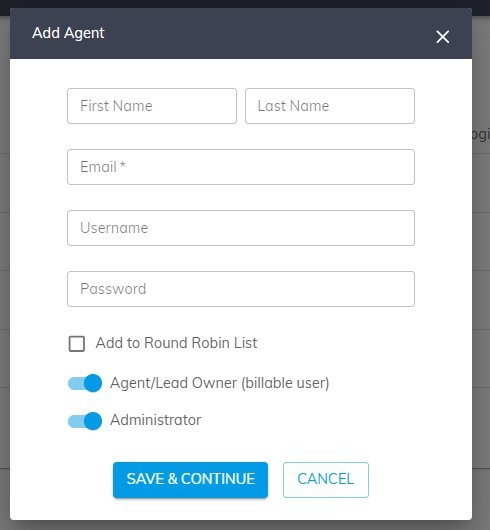
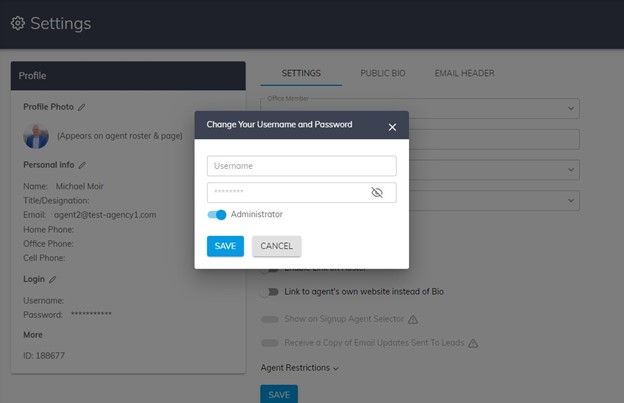
You can make an Agent/Lead Owner an Administrator when creating an Agent or by modifying an existing Agent’s profile by clicking the Pencil Icon by the Login section of My Profile.
Add New Agent
An Existing Agent
Additional Agent View
For Additional Agents:
If your admin has added you to the Team CRM and they’ve already created your logins, please use the following link to login: https://account.idxhome.com/login?resellerId=706