
Domain Info
Domain Basics FAQs
Section titled “Domain Basics FAQs”I Don't Know Who Owns My Domain. How Do I Find Out?
To find out who owns your domain, go to: https://who.is/ and type in your domain name.
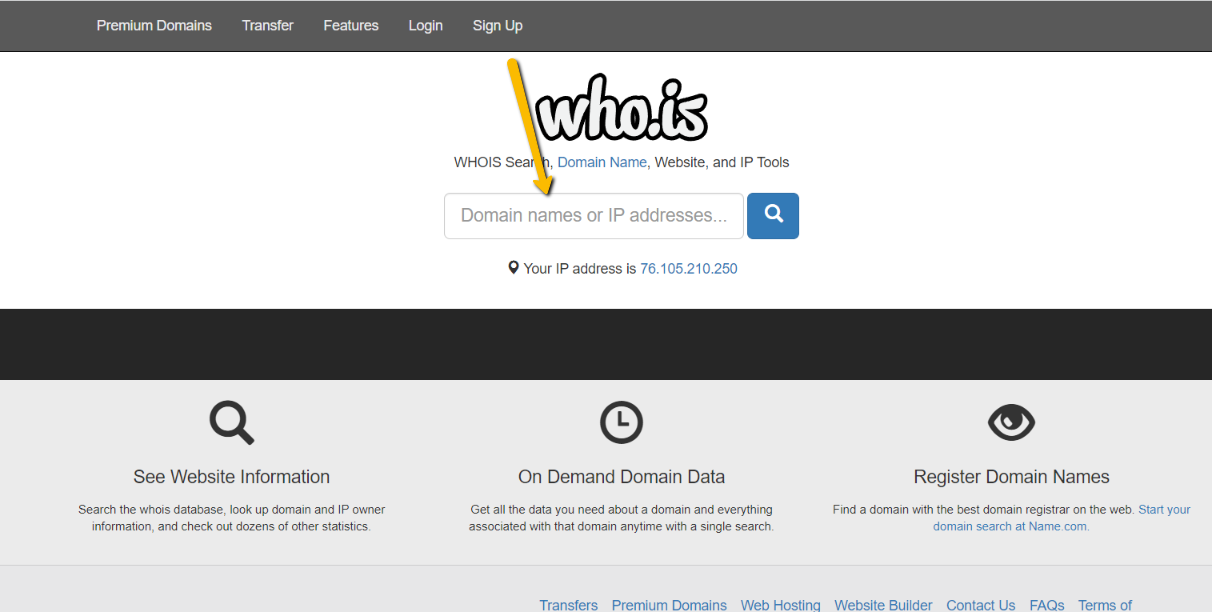
You will then see who owns the domain, as well as any other variations that are currently available.
What's The Difference Between DNS and NS?
- DNS – Domain Name System – the responsibility of assigning domain names and mapping those names to Internet resources
- Nameservers – a computer hardware or software server that implements a network service to respond to queries
What are the different types of DNS records?
-
Types of DNS Records:
- A record – Control location of website resources: ex: A Record is used to point a logical domain name, such as “google.com,” to the IP address of Google’s hosting server
- CNAME – is a type of resource record used to specify that a domain name is an alias for another domain, which is the “canonical” domain.
- MX Record – Mail Exchange record – Directs email services.
- TXT Record – text record – used to provide the ability to associate some arbitrary and unformatted text with a host of other names
What are MX/TXT Records?
Mail Exchange Records can be compared to a postal service in the world of the internet.
Imagine your email as a letter that needs to be delivered to a specific address. In this analogy:
Sender (You): You’re someone sending a letter (email) to a friend.
Recipient (Your Friend): Your friend’s address is like their email address.
Now, MX Records are like the postal service’s instructions on where to deliver the letter. They specify which mail servers are responsible for receiving emails on behalf of a particular domain. It’s like having a list of post offices that handle mail for your friend’s neighborhood.
So, when you send an email, your email client looks at the recipient’s domain (like agentelite.com), checks the MX Records for that domain, and sends the email to the specified mail server, much like a postman delivering your letter to the correct post office for your friend’s neighborhood.
In summary, MX Records act as the internet’s postal system, guiding emails to the right destination by specifying the mail servers responsible for handling messages for a particular domain.
Where are MX Records Stored?
DNS records, such as MX records, are stored on Name Servers. Therefore, your domain must have proper Name Servers so that the Domain Name System can answer queries about the necessary domain name records.
Can I use a sub-domain?
Sub-domains are not acceptable domains if you do not own the primary domain (ex., www.coldwellbanker.com/agentname). You must purchase your own domain for your website.
Can I use a WIX domain?
WIX domains cannot be used because we cannot edit the DNS records of WIX sites. You must transfer your domain to another host or purchase a new one.
Can I use a MailChimp domain?
MailChimp can be used, but to change DNS records, you will be required to request the change from MailChimp directly.
Preparing for the Transition to Your New AE Website
Section titled “Preparing for the Transition to Your New AE Website”When switching to your new Agent Elite website, there are a few key things to remember. One of the most critical aspects is ensuring that your email remains operational throughout the transition. This means properly coordinating with your old hosting provider, updating your DNS information, and ensuring all your website and email settings are correctly configured.
Switching to Your New AE Website
Before switching your domain to your new AE website, you must update your DNS information. This process involves logging into your domain registrar account and entering the new DNS information for your new web hosting provider. Once you have updated your DNS information, it can take up to 72 hours for all the independent routing tables to update their information. However, it usually happens within a few minutes or hours.
Coordinating the Transition
To ensure that your email remains operational throughout the transition, you must ensure that mailboxes are set up on the new server that match the mailboxes/aliases on the old server. This ensures that when your new server goes live, the mail sent to these mailboxes doesn’t bounce because they don’t exist.
You will also need to ensure that everyone with a mailbox at your domain knows how to change their personal mail program settings so they can check their mail on the new server. This means providing them with the necessary instructions and support to ensure they can easily make the switch when the time comes.
Finally, it is essential to coordinate with everyone so they know the time that the domain will be switching, so they can make the necessary changes to their settings. This will help to minimize any disruptions or downtime that may occur during the transition.
Changing Your Website and Email Settings
Once your new website is set up and your DNS information has been updated, it’s time to start changing your email settings. This typically involves configuring your email to point to your new server.
It’s important to remember that traffic may take several hours to direct to the new server. Therefore, it’s crucial to check your old server at least one last time before abandoning it. You can do this by using your old server’s webmail access or setting up a temporary account on your mail program and pointing it to your host’s mail server.
If you are having trouble setting up your local mail program to access the mail on your new server hosted with your new hosting provider, you can always check your mail via their webmail interface.
Conclusion
Transitioning to a new web hosting service can be a complex process, but by properly coordinating with AE and ensuring that your website and email settings are correctly configured, you can minimize any disruptions or downtime that may occur. Remember to take the necessary steps before switching your domain to ensure a smooth and successful transition.
Understanding MX/TXT Records
Section titled “Understanding MX/TXT Records”What are MX/TXT Records?
Mail Exchange Records can be compared to a postal service in the world of the internet.
Imagine your email as a letter that needs to be delivered to a specific address. In this analogy:
Sender (You): You’re someone sending a letter (email) to a friend.
Recipient (Your Friend): Your friend’s address is like their email address.
Now, MX Records are like the postal service’s instructions on where to deliver the letter. They specify which mail servers are responsible for receiving emails on behalf of a particular domain. It’s like having a list of post offices that handle mail for your friend’s neighborhood.
So, when you send an email, your email client looks at the recipient’s domain (like agentelite.com), checks the MX Records for that domain, and sends the email to the specified mail server, much like a postman delivering your letter to the correct post office for your friend’s neighborhood.
In summary, MX Records act as the internet’s postal system, guiding emails to the right destination by specifying the mail servers responsible for handling messages for a particular domain.
Where are MX Records Stored?
DNS records, such as MX records, are stored on Name Servers. Therefore, your domain must have proper Name Servers so that the Domain Name System can answer queries about the necessary domain name records.
How Do I Know if I Have MX Records?
If your email address is associated with your domain, for example, if your email looks like agent@myrealestatewebsite.com (as opposed to agent@gmail.com), then you have MX records.
You can use to find out if you have MX records associated with your domain.
How Do I Get My MX Records From GoDaddy?
Sign in to your GoDaddy Workspace Control Center.
Select Tools, then Server Settings.
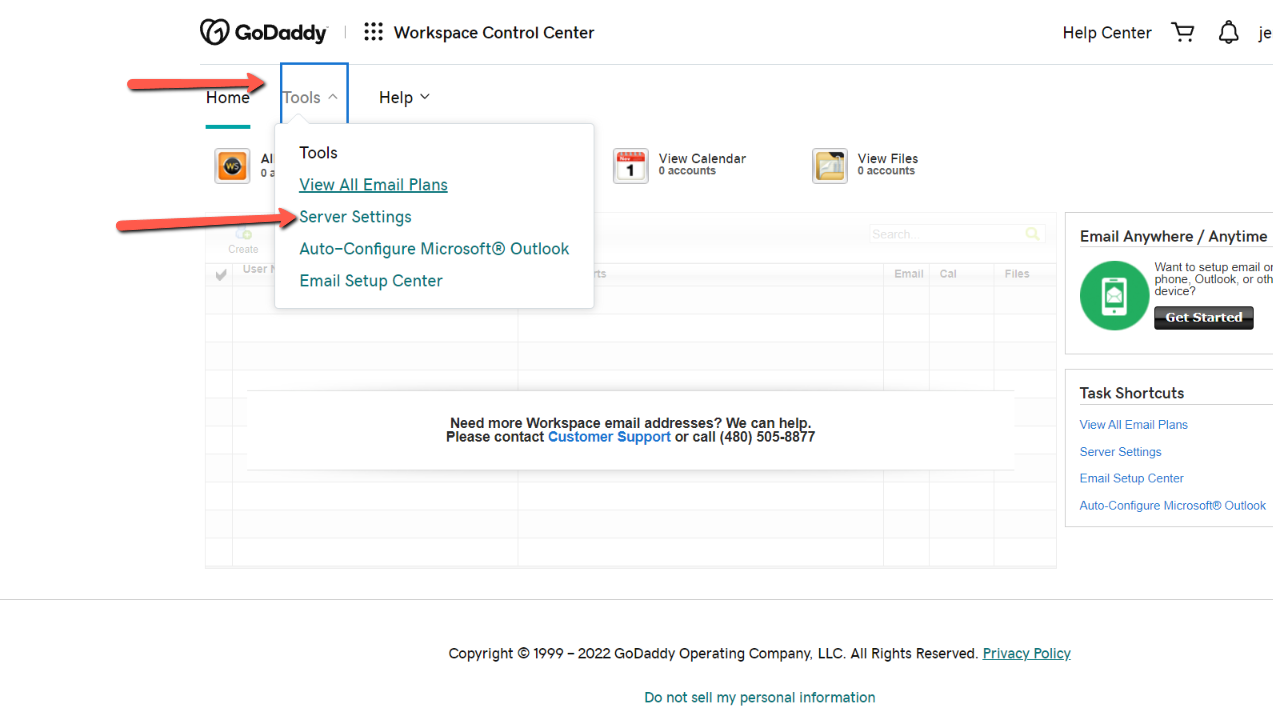
If you have MX Records, they will show here.
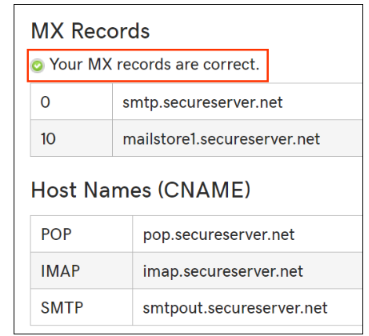
*Please note, it can take up to 48 hours for any changes to your domain’s MX records to complete.