
Text Messaging F.A.Q.s
Can I manually opt a lead into receiving text messages?
No. A lead must expressly consent to receive text messages via an opt-in form on the website.
What happens when a lead replies to a text message?
If a lead responds to a text message from a campaign, you will receive a notification with the lead’s response, the last message sent from your account, and the lead’s contact information. The response will display on your account’s dashboard as well as the lead’s individual profile.
What happens if a lead calls a texting number?
If a lead calls your texting number, the call will forward to the phone number listed on your account. You can change your forwarding number in the Control Panel under Communication > Texting.
Why am I not able to send text messages right away?
It takes a few business days for texting numbers to be registered with the messaging carriers before texting can begin. We register your numbers in order to keep your messages deliverable and compliant across carriers.
Can I use one of the texting numbers to text leads outside of a campaign?
No. This feature is for automated texting only. All texts are sent through Marketing Automation Campaigns.
How do I view the text messages in a campaign?
You can add a text message to a campaign by the following steps below:
Click into the campaign where you want to add the message
Click the + ADD MESSAGE button
Select ‘Text Message’
What is the TCPA?
The TCPA is the Telephone Consumer Protection Act. It lays out very specific rules that must be followed when using automated text messaging. TCPA violations can result in penalties of up to $500 per violation, with willful violations up to $1,500 per violation.
I'm getting an error message when I enter my Area Code?
Certain Area Codes are not available for the new texting beta feature. You will see the error message below if your Area Code is unavailable.
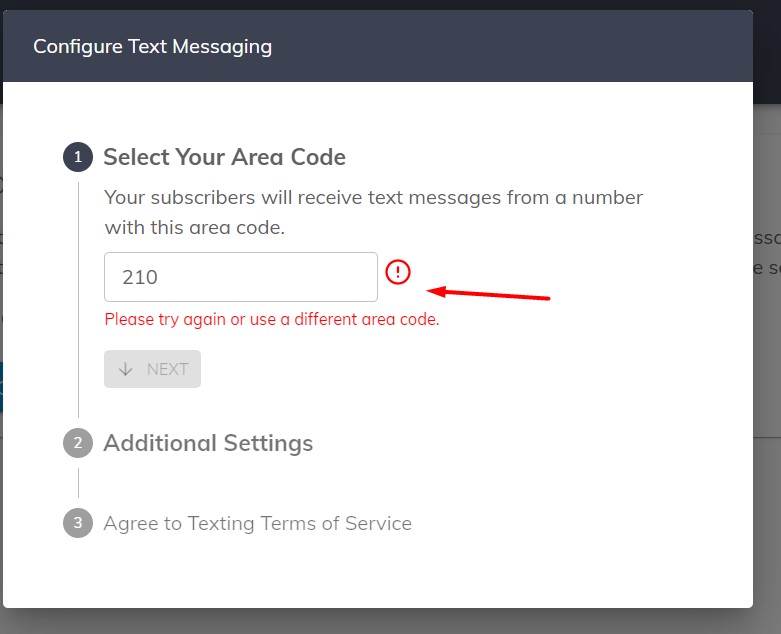
If this happens, please select the next closest Area Code.
For example, if you get an error message with Area Code 210, you can use 830 instead.
If you have any questions, please email us at support@agentelite.com; we’d be happy to help!